Context engineering is the discipline of giving an LLM exactly the information + tools it needs for the next step, while keeping everything else stored, searchable, and recoverable.
0) The promise (what this playbook helps you ship)
- Agents that stay on-task across long horizons
- Lower latency + cost (token discipline, cache-friendly prompts)
- Fewer tool mistakes (wrong tool / wrong schema / wrong args)
- Faster debugging (structured traces, deterministic context builds)
- Safer autonomy (scoped permissions, approvals, audit trails)
1) Mental models that keep teams aligned
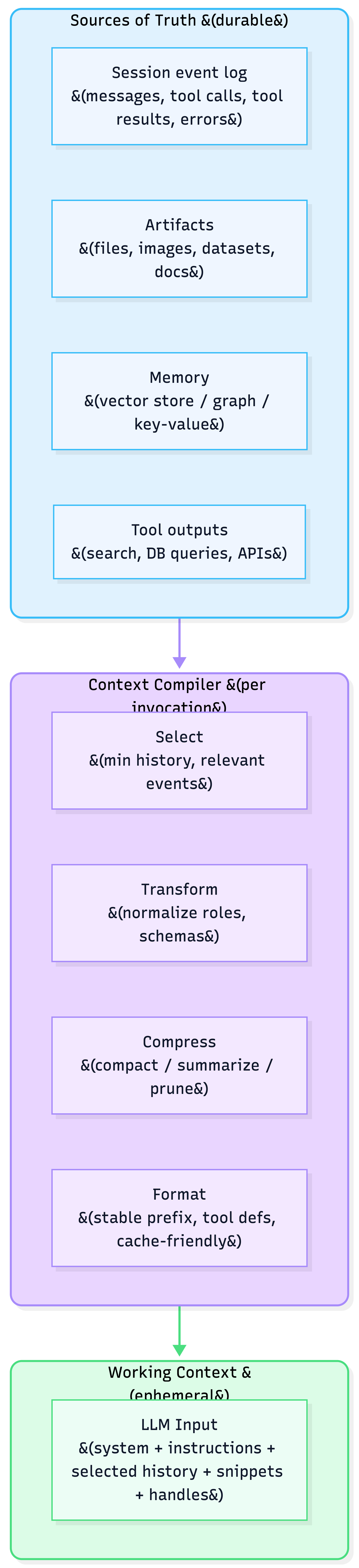
1.1 Context as a compiled view (not a string buffer)
- Source of truth: session events, artifacts (files), memory stores, tool outputs
- Compiler pipeline: processors that select/transform/compress/format
- Working context: the compiled projection sent to the model for this call
1.2 “Fit red to green” (Total vs Needed vs Retrieved)
- Total context: everything the agent could access
- Needed context: the minimum actually required for the next action
- Retrieved context: what you pulled into the model window
Goal: retrieved ≈ needed (small superset).
Too small → hallucinations / wrong actions.
Too large → slow, expensive, “lost in the middle”.
2) The 4 core strategies: Write → Select → Compress → Isolate
Think of these as your “context knobs”.
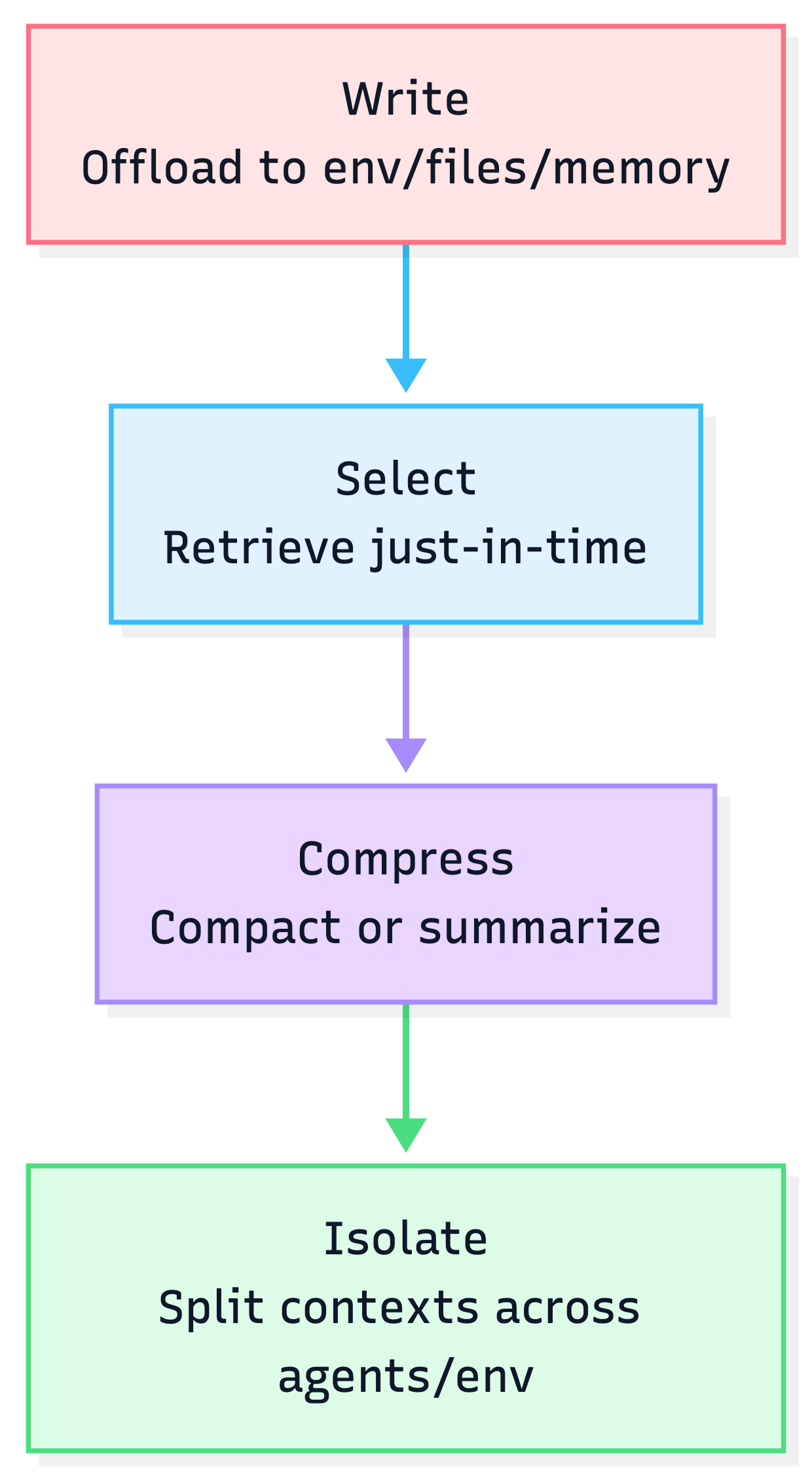
2.1 Write: offload context outside the window
Patterns
- Filesystem as scratchpad (tool outputs, notes, plans)
- Artifacts as handles: store large objects and reference by ID/path/version
- State object: structured runtime state (schema enforced)
Rule of thumb
If it’s big, repeatable, or not needed on every step → write it out and keep a handle.
2.2 Select: pull context only when needed
Patterns
- Retrieval from artifacts via search/grep + targeted reads (line ranges)
- Memory fetch (episodic/procedural/semantic) with predictable triggers
- Tool retrieval (fetch a tool subset when toolset is large)
Selection checklist
- What decision is being made now?
- What are the top 3 missing facts that would change the action?
- What is the smallest unit of retrieval (file path + line range; table row; doc section)?
2.3 Compress: reduce token load without losing recoverability
Two modes
- Compaction (reversible): replace content with references (paths/URLs/IDs)
- Summarization (lossy): distill older history when you must
Recommended order
Raw → Compaction → Summarize (only when compaction can’t free enough room).
2.4 Isolate: split context to prevent explosion
Patterns
- Subagents with narrow scopes and their own context windows
- “Agent-as-a-tool”: call a worker agent with a strict schema; return structured output
- Environment isolation (run code, store large objects in sandbox state, return only results)
3) Design principles that make context production-grade
3.1 Make your prompt prefix stable (cache-friendly)
Why: Agents are input-heavy and output-light. Tiny prefix changes can destroy cache re-use.
Do
- Stable system prompt + tool definitions
- Deterministic serialization (stable JSON key ordering)
- Append-only traces (don’t rewrite prior steps)
Don’t
- Timestamps in the system prefix
- Dynamic tool definitions that change every turn (unless absolutely necessary)
3.2 Keep tool selection reliable
Common failure: large toolsets → wrong tool / wrong args / schema violations.
Strong patterns
- Hierarchical action space: small core tools + “shell”/“runner” tool for everything else
- Mask, don’t remove: avoid changing tool definitions mid-loop; constrain selection via decoding/required tools
- Constrain outputs: schema-constrained / structured outputs for tool args and critical artifacts
3.3 Preserve error evidence (don’t “clean the trace”)
A failed tool call is signal. Keeping it in the trace helps the model avoid repeating the same mistake and helps you debug.
4) Reference architecture: the Context Stack
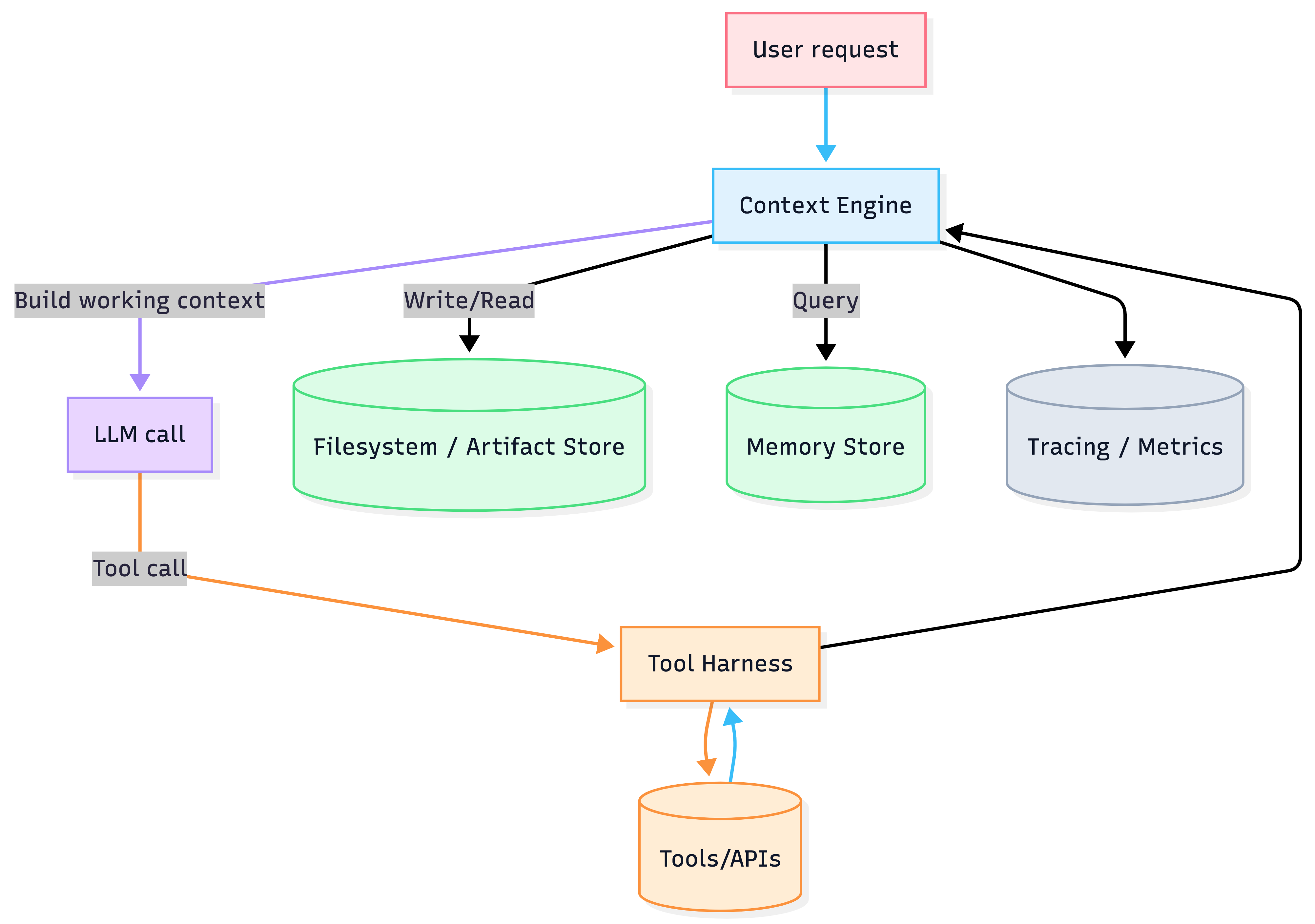
Components
- Context Engine: selection + formatting + compaction/summarization
- Tool Harness: executes tools, enforces permissions, logs everything
- Artifact Store / Filesystem: durable, versioned “infinite context”
- Memory: long-term retrieval (user prefs, prior outcomes, procedures)
- Observability: token metrics, retrieval quality, tool error rates, cache hit rate
5) Implementation playbook (what to build first)
Step 1 — Define your “Working Context Contract”
A simple YAML/JSON spec that answers:
- What is always included? (stable prefix, guardrails, tool defs)
- What is optional? (memories, artifacts, prior tool results)
- What are hard caps? (token budgets by section)
Template
working_context:
  prefix:
    system_instructions: stable
    tools: stable
  history:
    max_turns: 12
    include_errors: true
  retrieval:
    max_artifacts: 5
    max_snippets_per_artifact: 3
  budgets:
    total_tokens_soft: 60000
    total_tokens_hard: 90000
Step 2 — Add a filesystem/artifact layer early
- Store all large tool outputs as files
- Keep only handles + summaries in the chat history
- Enable grep/glob + line-range reads
Step 3 — Add compaction triggers before “context rot”
- Monitor effective performance degradation before hard window limits
- Compact first; summarize only when needed
- Keep the latest 1–3 turns raw to preserve “rhythm”
Step 4 — Add scoped subagents (only where they pay for themselves)
- Use subagents for parallelizable, read-heavy tasks (research, code search, doc review)
- Return structured results to the lead agent
- Avoid “everyone shares everything”
6) Failure modes & mitigations (what breaks, how you catch it)
6.1 Failure modes (symptoms → root causes)
| Failure mode | What it looks like | Typical root cause |
|---|---|---|
| Context poisoning | Agent repeats a wrong fact confidently | Hallucination entered the trace/memory |
| Context distraction | Over-focus on irrelevant history | Too much unfiltered tool output / logs |
| Context confusion | Wrong tool calls, wrong args | Toolset too big; overlapping tool descriptions |
| Context clash | Contradictory instructions followed | Multiple sources disagree (system vs memory vs user) |
| Context rot | Quality drops as window fills | Effective window smaller than max; polluted context |
| Telephone effect | Subagent outputs drift/contradict | Passing raw transcripts between agents |
6.2 Detection signals (instrument these)
Context signals
- Token usage by section (prefix / history / retrieval / tool results)
- Retrieval “waste”: retrieved tokens ÷ used tokens (proxy via citations/attribution)
- Conflicts: multiple instructions for same rule (lint your prompt/memory)
Tool signals
- Tool error rate + retry rate
- Schema violation rate (invalid JSON, missing required fields)
- Wrong-tool rate (human labels or heuristic validators)
Outcome signals
- User corrections per task
- Time-to-completion per task
- Rollback frequency (undo/redo steps)
6.3 Constraints (reduce blast radius)
- Permission gating: allowlist tools by environment (dev/stage/prod)
- Human-in-the-loop for risky actions (payments, deletes, external comms)
- Read-only default for research agents
- Structured outputs for tool args and final artifacts
- Step budgets: max tool calls / max wall clock / max tokens
6.4 Prevent regression (make it an eval problem)
Regression suite
- “Golden tasks” (representative end-to-end flows)
- Adversarial prompts (jailbreaks, conflicting instructions, long-horizon drift)
- Tool misuse tests (wrong args, forbidden tools, ambiguous requests)
- Context stress tests (large artifacts, long traces, noisy tools)
Rule: every prod incident becomes:
- a failing test,
- a new guardrail, or
- a tool/schema fix.
7) Governance posture (permissions, approvals, audit trails, rollout)
7.1 Permissions model (recommended default)
- RBAC: user roles → agent capabilities → tool allowlists
- Environment separation: dev/stage/prod toolsets differ
- Scoped tokens: short-lived credentials, least privilege
- Break-glass: emergency disable for tools + “safe mode” agent
7.2 Approvals (human oversight where it matters)
Approval gates
- External side effects (email/send, financial actions, deletes)
- Security-sensitive actions (secrets, IAM changes)
- Compliance-sensitive domains (health, finance, hiring)
UI pattern: “Plan → Preview → Approve → Execute → Report”
7.3 Audit trails (make investigations trivial)
Store as immutable events:
- user input, model outputs, tool args/results, file writes, permissions decisions
- model + prompt version, tool versions, retrieval IDs, cache mode
7.4 Rollout strategy (ship safely)
- Canary by cohort (internal → friendly users → broader)
- Feature flags by tool capability (not just UI)
- Shadow mode for new retrieval/compaction logic
- Automated rollback triggers on tool error spikes / safety violations
7.5 Risk frameworks (for serious orgs)
If you need a governance vocabulary: align your internal controls to
- NIST AI RMF (GOVERN / MAP / MEASURE / MANAGE)
- EU AI Act human oversight (where applicable to “high-risk” systems)
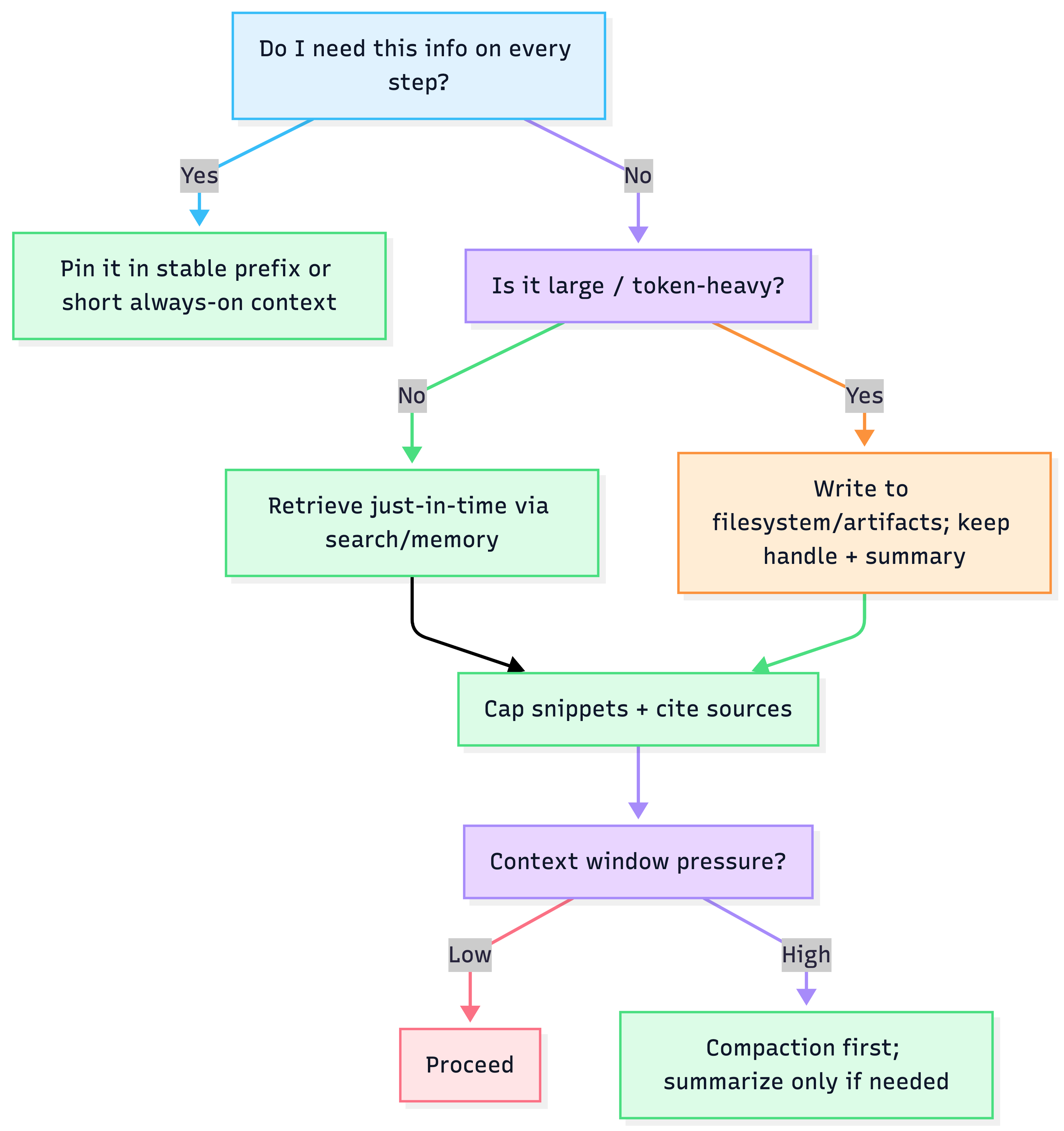
8) Quick reference: decision tree
9) Copy/paste templates
9.1 Artifact manifest (per project)
artifacts:
  - id: "requirements_v3"
    type: "doc"
    path: "/artifacts/reqs_v3.md"
    summary: "User requirements and constraints"
  - id: "api_spec"
    type: "openapi"
    path: "/artifacts/openapi.yaml"
    summary: "API contract + schemas"
9.2 Handoff contract (lead → subagent)
handoff:
  goal: "Find relevant code paths for token budget handling"
  inputs:
    - "/repo/agent/context_engine.py"
  constraints:
    max_steps: 12
    allow_tools: ["grep", "read_file"]
  output_schema:
    files:
      - path: string
        why_relevant: string
        line_ranges: [string]
9.3 Compaction policy (reversible first)
compaction:
  triggers:
    token_usage_pct: 0.80
    turns: 40
  policy:
    - remove_raw_tool_payloads_if_saved_to_artifact: true
    - keep_last_turns_raw: 3
    - summarize_oldest_turns_if_needed: true